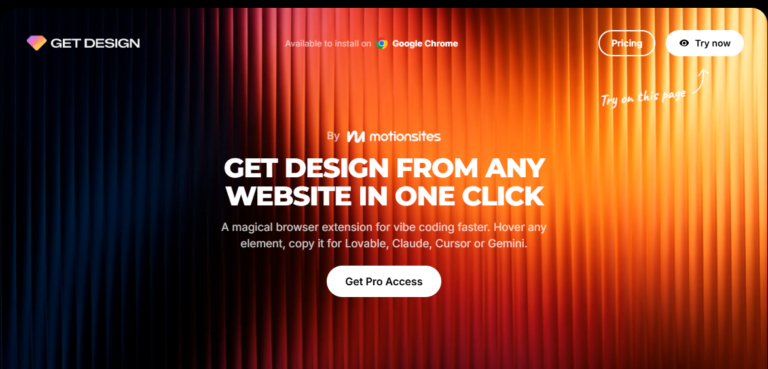
Get Design – Copy Any Website Design In One Click
$139.00 Original price was: $139.00.$25.00Current price is: $25.00.
- 24/7 Contact Support & Telegram - Ecomkevin_1
- You Can Request Any Courses
- Original Courses HD Qualite and links updated
Guaranteed Safe Checkout


Get Design – Copy Any Website Design In One Click: An Honest, In-Depth Review
Finding design inspiration across the web is easy, but converting a live website’s visual layout into clean, usable assets or code is often a tedious task. Designers and developers frequently spend hours inspecting elements, extracting CSS properties, downloading assets, and rebuilding structures from scratch.
The promise of Get Design – Copy Any Website Design In One Click is straightforward: streamline that entire process down to a single action. But does this tool truly deliver on its ambitious claim, or does it fall short when faced with modern, complex web architectures?
In this comprehensive review, we evaluate its performance, feature set, workflow efficiency, and overall value to help you decide if it deserves a place in your digital toolkit.
What Is Get Design?
Get Design is a web development and design productivity tool engineered to capture UI elements, layout structures, styling rules, and visual assets directly from any active browser tab. Designed primarily as a browser extension or lightweight utility, it aims to bridge the gap between web inspiration and practical execution.
Instead of manually digging through Chrome DevTools to copy dynamic classes, nested divs, or background assets, the tool automates the extraction process. It parses the DOM (Document Object Model) of a target webpage and packages the design elements into formats that can be reused in popular web builders, design software, or code editors.
Key Features Breakdown
To understand whether this tool delivers on its single-click value proposition, we need to examine its core functionality under the hood.
1. Instant Layout and Structural Extraction
The core selling point is speed. When activated on a webpage, the tool scans the active viewport or full page, identifying structural containers like headers, hero sections, feature grids, and footers. Rather than capturing a flat image, it preserves the underlying block hierarchy, allowing users to interact with individual design components.
2. CSS and Style Parsing
Extracting inline and external stylesheets can quickly become a headache due to CSS specificity, framework-specific utilities (like Tailwind or Bootstrap), and inherited styles. The tool isolates specific component styles—including typography, color palettes, spacing, border radii, and drop shadows—and presents them in a clean format ready for implementation.
3. Asset and Vector Harvesting
Modern websites rely heavily on SVGs, optimized WebP images, and custom icon fonts. Manually downloading individual vector icons or extracting CSS background images takes away valuable time. The extension automatically detects and collects media assets associated with selected elements, making visual assets instantly downloadable.
4. Direct Export Options
Having design data is only useful if it integrates smoothly into your existing workflow. The software provides direct export capabilities into standard HTML/CSS code snippets, JSON representations, or clipboard data compatible with leading visual site builders and UI design tools.
Real-World Performance: Putting the Tool to the Test
To evaluate how well it performs in realistic scenarios, we tested the tool across three distinct web environments: a minimalist static landing page, a complex SaaS dashboard, and a media-heavy e-commerce store.
       +-------------------------------------------------------+
       |             TARGET WEBPAGE DOM ANALYSIS               |
       +-------------------------------------------------------+
                                   |
                                   v
             +-------------------------------------------+
             |         GET DESIGN ENGINE PARSER          |
             +-------------------------------------------+
               /                 |                     \
              /                  |                      \
             v                   v                       v
    [ HTML / DOM Structure ] [ Clean CSS & Fonts ] [ SVG & Image Assets ]
             \                   |                      /
              \                  |                     /
               v                 v                    v
       +-------------------------------------------------------+
       |         READY-TO-USE CODE / DESIGN COMPONENT        |
       +-------------------------------------------------------+
Scenario 1: Minimalist SaaS Landing Page
On clean, modern landing pages built with standard structural containers, the tool performs exceptionally well. Hero sections, call-to-action buttons, typography hierarchies, and simple grid layouts are captured almost flawlessly. Text elements retain their desktop font sizing, and button hover states are captured without requiring extensive code cleanup.
Scenario 2: Dynamic SaaS Application Dashboards
Dashboards featuring heavy JavaScript execution, dynamic state management, and shadow DOM elements present a tougher challenge for any cloning tool. While it successfully captured visual components like navigation sidebars, data cards, and tables, dynamic elements requiring active API responses naturally needed manual adjustments post-export.
Scenario 3: Media-Heavy E-Commerce Layouts
E-commerce sites often utilize nested image carousels, mega menus, and sticky conversion bars. The tool handled product grids and visual styling effectively, though complex interactive widgets like multi-tiered dropdowns required slight structural refining after export.
Who Benefits Most from This Tool?
While the tool is designed to be accessible to anyone working on the web, specific disciplines will find varying degrees of utility in their daily workflows.
| User Role | Primary Use Case | Efficiency Impact |
|---|---|---|
| UI/UX Designers | Rapidly capturing real-world layouts to study spatial relationships and typography scales. | High reduction in manual screenshotting and UI recreation time. |
| Frontend Developers | Extracting base HTML/CSS structures from reference sites to kickstart component builds. | Moderate-to-high time savings on boilerplate coding. |
| Agency Owners & Freelancers | Demonstrating quick layout concepts and wireframe structures during client discovery phases. | Significant acceleration of early prototyping workflows. |
| Marketers & Copywriters | Analyzing competitor landing page structures and call-to-action placements. | High accessibility without needing deep coding expertise. |
Pros and Cons
Every productivity tool comes with trade-offs. Here is an honest assessment of its strengths and limitations.
Advantages
-
Significant Workflow Acceleration: Eliminates dozens of repetitive steps involved in manual element inspection and styling replication.
-
Clean Asset Organization: Automatically aggregates SVGs, icons, and image URLs, saving time during content gathering.
-
Low Learning Curve: Designed with an intuitive point-and-click interface that requires minimal technical setup.
-
Reduces Boilerplate Coding: Generates structural code baselines that developers can quickly refine and adapt.
Limitations
-
Not a Full-Site Replicator: While component-level capture is strong, attempting to copy an entire multi-page web application in one click remains unrealistic due to backend logic and database dependencies.
-
Post-Export Cleanup Required: Complex framework-generated CSS classes (e.g., heavily obfuscated utility classes) often require refactoring for production environments.
-
Dynamic JavaScript Limits: Interactive states reliant on heavy client-side scripts will not retain full functional logic out of the box.
Ethical and Legal Considerations
Tools that simplify visual duplication must be used responsibly. While analyzing and learning from web layouts is a standard practice in digital design, direct duplication of proprietary branding, trademarked assets, or full website copies for commercial representation can raise legal and intellectual property concerns.
Best Practice: Use layout extraction tools as a foundation for prototyping, studying UX patterns, and building custom components—never for impersonating existing brands or stealing proprietary creative works.
Final Verdict: Is It Worth It?
If your daily work involves web design, frontend prototyping, or competitive UI analysis, Get Design – Copy Any Website Design In One Click provides genuine utility. It turns a manual, multi-step inspection process into an efficient workflow, making component capture fast and painless.
While no single tool can instantly replicate complete, highly dynamic web applications with perfect backend integration, this software excels at what matters most: saving time during the preliminary design and front-end scaffolding phases. For designers, developers, and agency teams seeking to accelerate their build speed and streamline inspiration gathering, it proves to be a valuable addition to any digital workspace.
